ZenMarkup Privacy Analytics WordPress Plugin
Most WordPress analytics tools make you choose one of two bad options.
Use Google Analytics, and you need a consent banner.
Use a self-hosted tool, and you often get a basic dashboard that does not tell you much.
ZenMarkup Privacy Analytics is built to fix that.
It is a cookieless analytics plugin for WordPress. It works without a consent banner, shows a full dashboard inside WP Admin, and does not load anything from third-party servers.
Why privacy-first analytics matter
If you track visitors across sessions or websites, consent is usually required under rules like GDPR, CCPA, and PECR. Cookies, localStorage, and many fingerprinting tools fall into that category.
That is why so many analytics tools need a banner.
ZenMarkup Privacy Analytics avoids that problem. It does not use cookies. It does not store raw IP addresses. It does not send visitor data to outside services. The internal visitor signature also rotates every 24 hours, so the same person tomorrow is counted as a new visitor — there is no persistent cross-day identifier that could be linked back to an individual.
Your data stays inside your own WordPress database.
What you get
After activation, tracking starts right away.
There is no account to create, no API key to enter, and no code snippet to paste.
A new Analytics menu appears in WP Admin with four tabs:
- Overview
- Traffic
- Geography
- Behavior
You can set a date range at the top, and it applies to every tab. Each tab also has its own CSV export button.
Overview
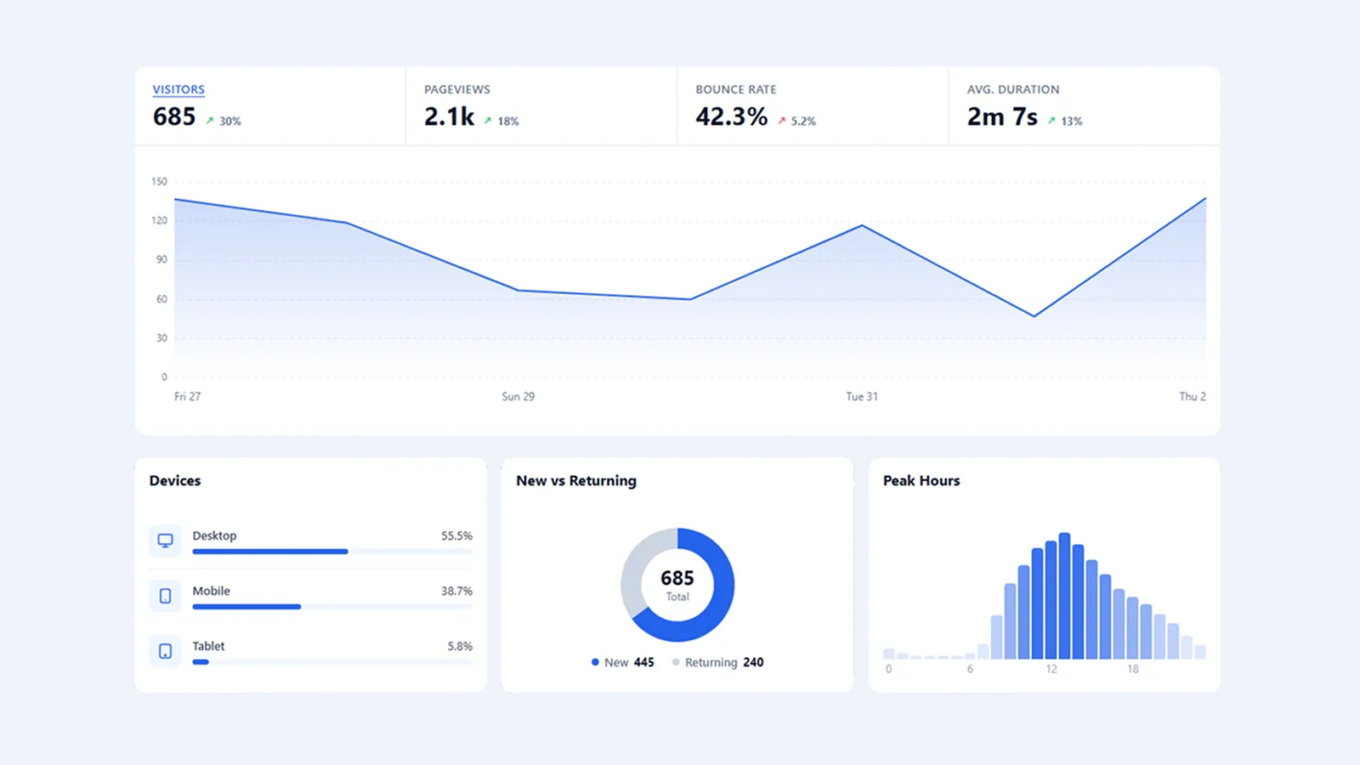
The Overview tab shows four main numbers:
- visitors
- pageviews
- bounce rate
- average session duration
You also get a comparison with the previous matching period.
Below that is an interactive line chart. You can switch between metrics and hover over the graph to see exact values by day or by hour.
The tab also includes:
- Devices, with desktop, mobile, and tablet traffic
- New vs Returning, shown as a donut chart
- Peak Hours, so you can see when people are actually on the site
Device detection happens on the server from the User-Agent string, so there is no extra browser script for fingerprinting.
Traffic
The Traffic tab is split into two sections: human traffic and bot traffic.
Human traffic shows:
- Top Pages, so you can see which URLs people actually visit
- Top Sources, so you can see which domains send visitors
- Campaigns, with UTM data like utm_source, utm_medium, and utm_campaign
The plugin stores clean paths only, so your page list does not get messy.
Bot traffic has its own section and can be hidden in Settings if you do not need it.
Geography
The Geography tab shows where your visitors come from.
It includes an interactive world map that you can zoom and move around. Hover over a country to see visitor counts. Click it to drill down to city-level data.
You also get tables for countries and top cities, so you can read the data without using the map.
Geolocation is optional and runs entirely on your own server. The plugin downloads a free DB-IP City Lite database once a month and reads it locally — no per-visitor call to any third-party API. Only country and city names are stored.
Behavior
The Behavior tab focuses on what people actually do on the site.
It includes Exit Intelligence, which groups final pageviews into four types:
- Left fast
- Single page
- Short session
- Normal exit
This makes it easier to spot weak pages and broken journeys. User Journeys shows the most common paths visitors take through the site.
Events includes:
- outbound links
- file downloads
- mailto links
- tel links
- 404 hits
- custom events
You can turn auto-tracked events on or off separately.
The tab also includes 404 pages and dead pages. A page is flagged when it gets enough traffic but still performs badly, which usually means something is broken or mis-targeted.
Privacy by design
The plugin is designed to collect useful data without identifying individual visitors.
It uses:
- no cookies
- no localStorage
- no sessionStorage
- no raw IP storage
- no third-party scripts in the dashboard
- no external fonts or CDN assets
- a daily-rotating salt, so the internal visitor hash cannot be linked across days
If geolocation is enabled, IP-to-location lookups happen locally against the self-hosted database. The only external request is a once-a-month database refresh from a CDN — there is no per-visitor call to any third-party service, and the visitor’s browser never contacts anyone but your site.
Email reports
If you do not want to check the dashboard every week, the plugin can send weekly or monthly email reports.
Each report includes:
- core metrics
- comparison with the previous period
- top pages
- top referrers
You can send reports to one person or to a full team. There is also a test button, so you can preview the email before turning it on.
Settings and access control
Settings live under their own menu and include three tabs:
- General — data retention, logged-in user exclusion, geolocation, and event toggles
- Access — roles, IP exclusions, and bot traffic visibility
- Email Reports — schedule, recipients, and test sends
A separate Privacy menu item shows a plain-language summary of what is stored and what is not, which you can link to from your own privacy policy.
Built to stay out of the way
The tracking script is small, loads async, and sends data through admin-ajax.php instead of the REST API. That helps it work better with caching and optimization plugins.
The plugin supports WordPress 5.6 through 7.0 and PHP 7.4+.
There is no background cron except for email reports. Data retention is controlled, so the database does not grow forever. CSV export is available on every tab.
Install in 60 seconds
- Open Plugins → Add New in WordPress.
- Search for ZenMarkup Privacy Analytics.
- Click Install, then Activate.
Tracking starts immediately. On a live site, you will usually see visitors within a few minutes.
About
ZenMarkup Privacy Analytics is built and maintained by ZenMarkup. It is GPLv2 licensed and free to use on any number of sites.
Bug reports, feature requests, and support questions go through the WordPress.org support forum.